The Bio.ax Chrome extension: a short link in one click.

On your video, your product or your article? Click the Bio.ax icon: the address and title are already filled in, the short link is copied right away with its QR code. And on a phone, it opens the YouTube, Instagram or TikTok app directly, not the browser.
Free extension Opens the app HD QR code No history collected
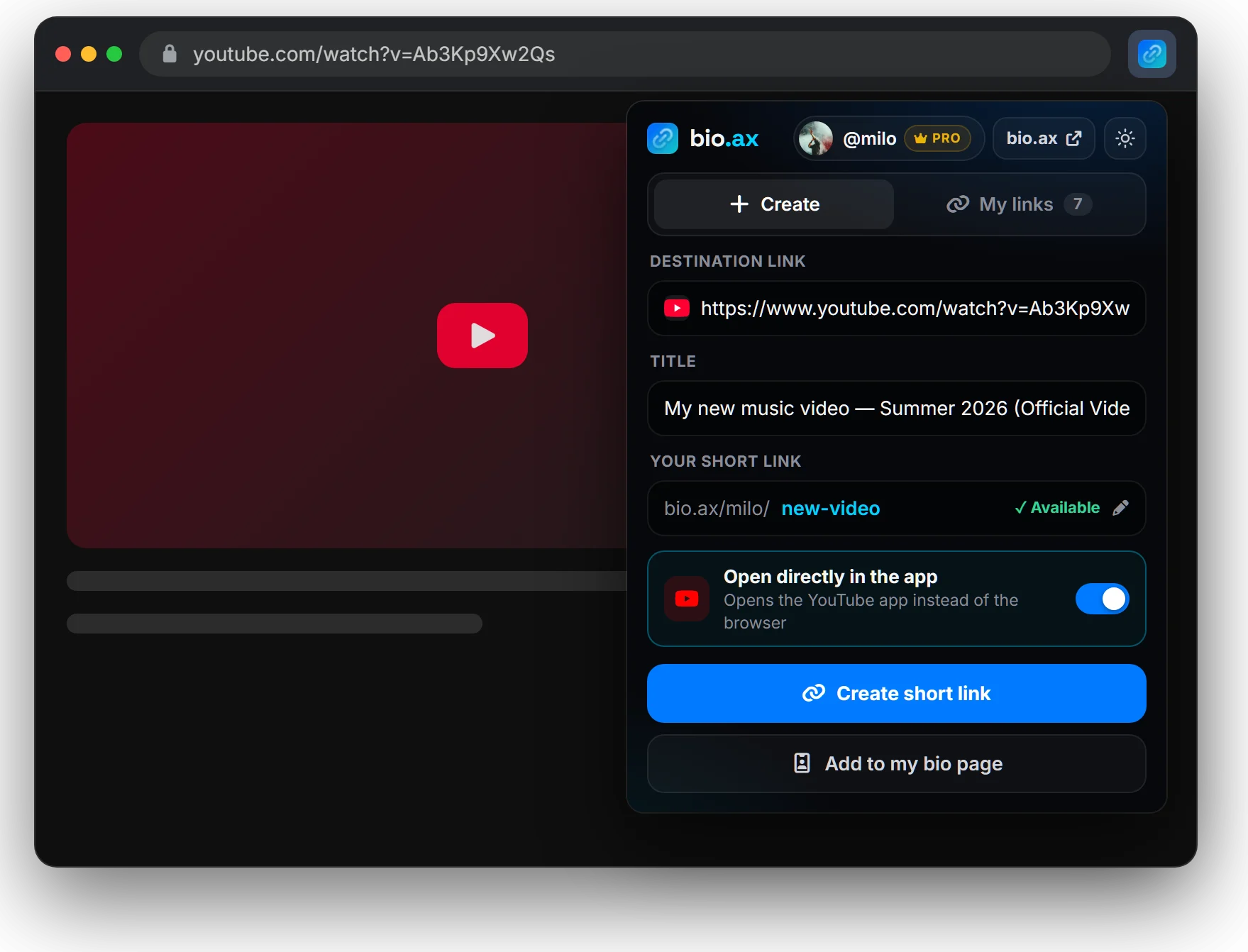
The Bio.ax Chrome extension open on a YouTube video: destination link, title and short link bio.ax/milo/new-video already filled in, “Open directly in the app” switched on
Without changing tabs

A raw address, or a Bio.ax link in one click

Copying a page's address and pasting it as is means sharing a long, unreadable link loaded with tracking parameters, that opens in the browser. The extension turns it into a Bio.ax link without you leaving the page.

With the Bio.ax extension
Creating the short link In 1 click
Address and title Filled in for you
Link copied Right away
On a phone Opens the app
QR code Ready right away
Sharing In 1 click
Open in the app

The extension recognizes the platform and prepares the deep link.

Open the extension on a YouTube clip, a Spotify album, an Amazon product or an Instagram profile: it shows the platform's logo and offers “Open directly in the app”. Your Bio.ax link then launches the app on your audience's phone, already logged in, instead of a web page where nobody is identified.

  • YouTube, Instagram, TikTok, Spotify, Amazon and 100+ apps
  • More followers, views and sales than with a regular link
  • Link ending in your name: bio.ax/you/album
See compatible apps
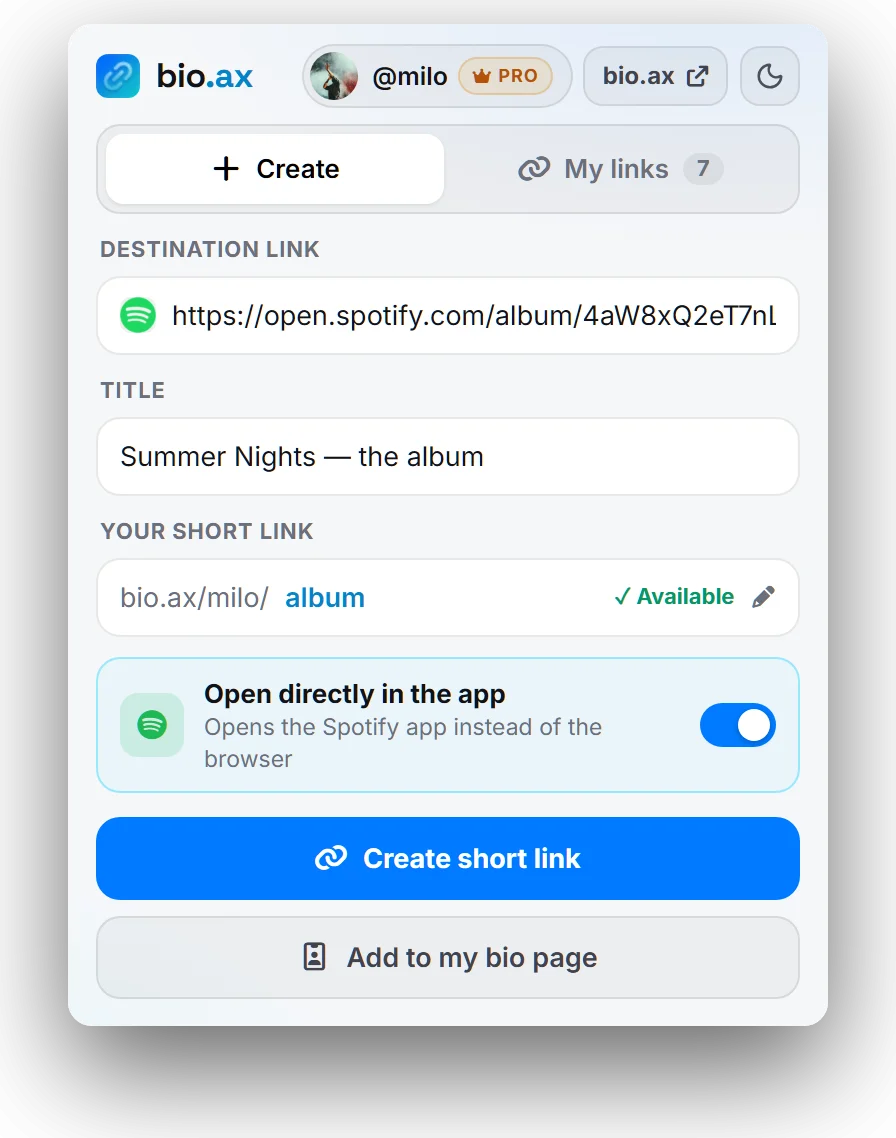
Bio.ax extension in light mode on a Spotify album, with the link bio.ax/milo/album and the Open Spotify app option instead of the browser
QR code and sharing

The link is already copied. The QR code is ready too.

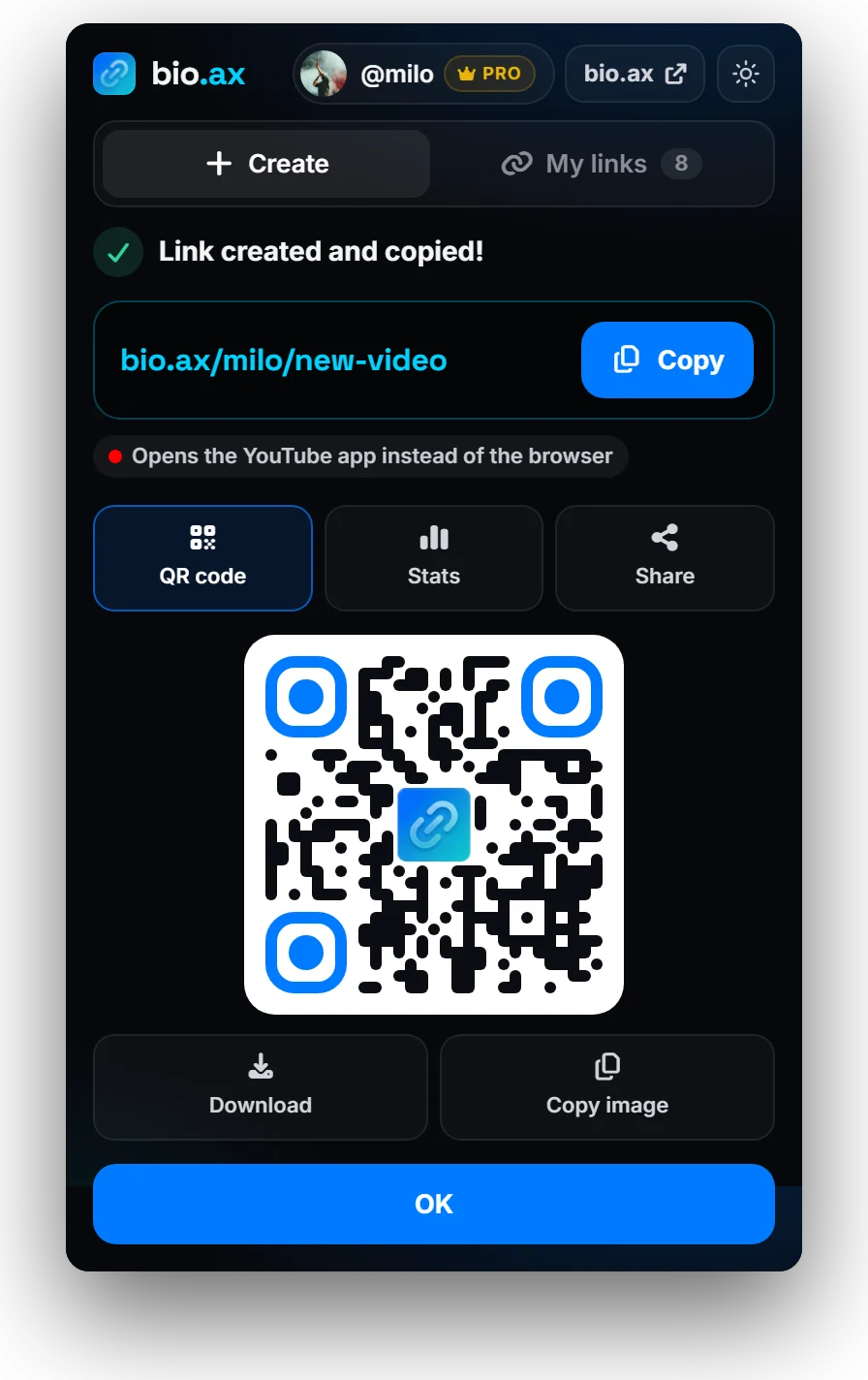
As soon as you click Create short link, it goes to your clipboard: paste it straight into your story, your email or your description. Right below, a QR code in Bio.ax colors to download as an HD PNG or copy as an image, for a poster, a flyer or a slide.

  • One-click sharing to WhatsApp, X, Facebook, LinkedIn or by email
  • Direct access to the link statistics
  • Right-click “QR code for this page”, even without a short link
Add to Chrome
Link bio.ax/milo/new-video created and copied, with QR code, Stats and Share buttons, and the Bio.ax QR code ready to download
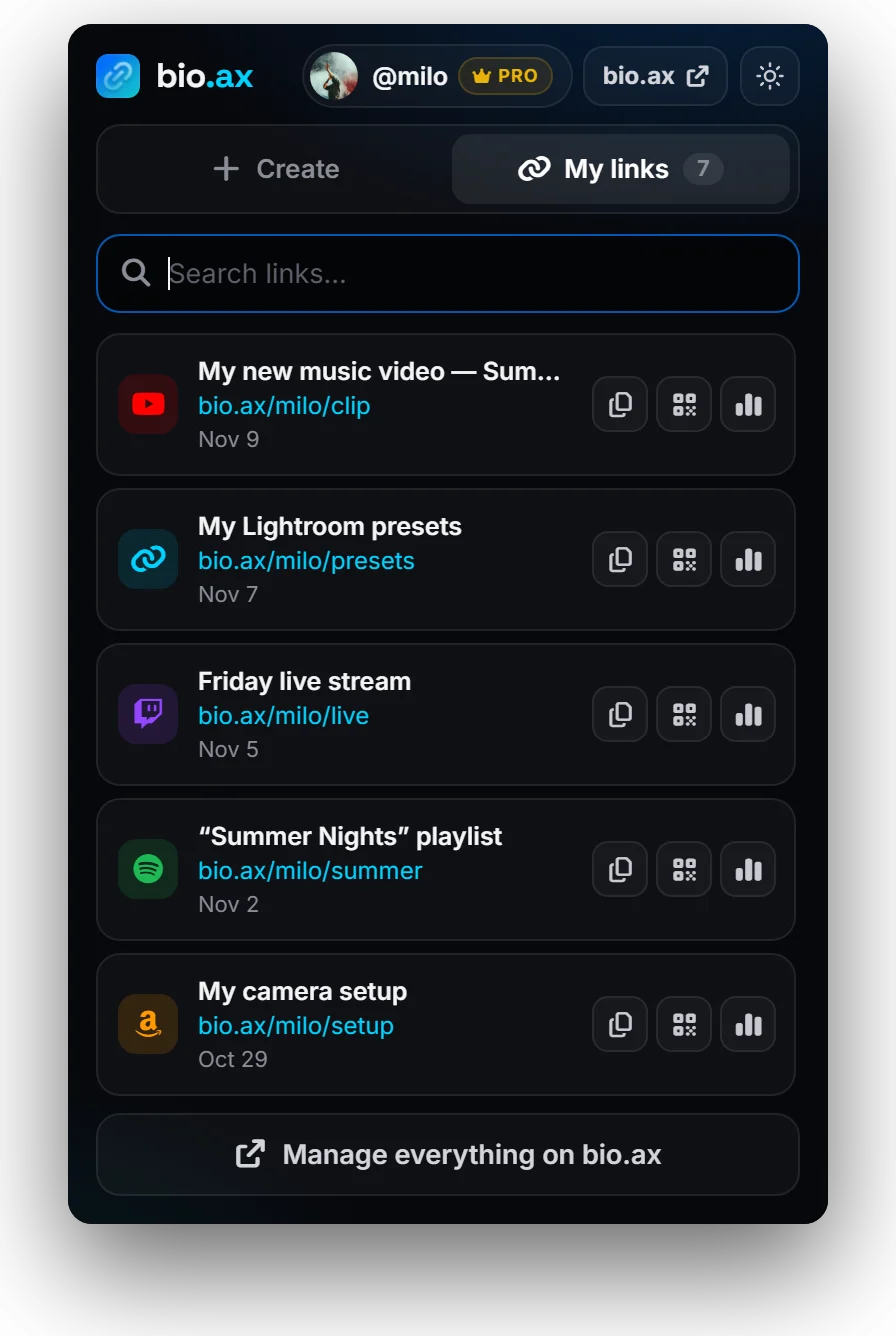
My links

All your short links, without opening the dashboard.

The My links tab lists your Bio.ax links with their platform's logo. Search for “clip” or “presets”, then copy the link, show its QR code or open its statistics. Handy to answer a message in two seconds with the right link.

  • Search by title, address or link ending
  • Copy, QR code and stats on every row
  • The same links as on bio.ax and on your phone
My links tab of the Bio.ax extension: list of YouTube, Twitch, Spotify and Amazon short links with copy, QR code and statistics buttons
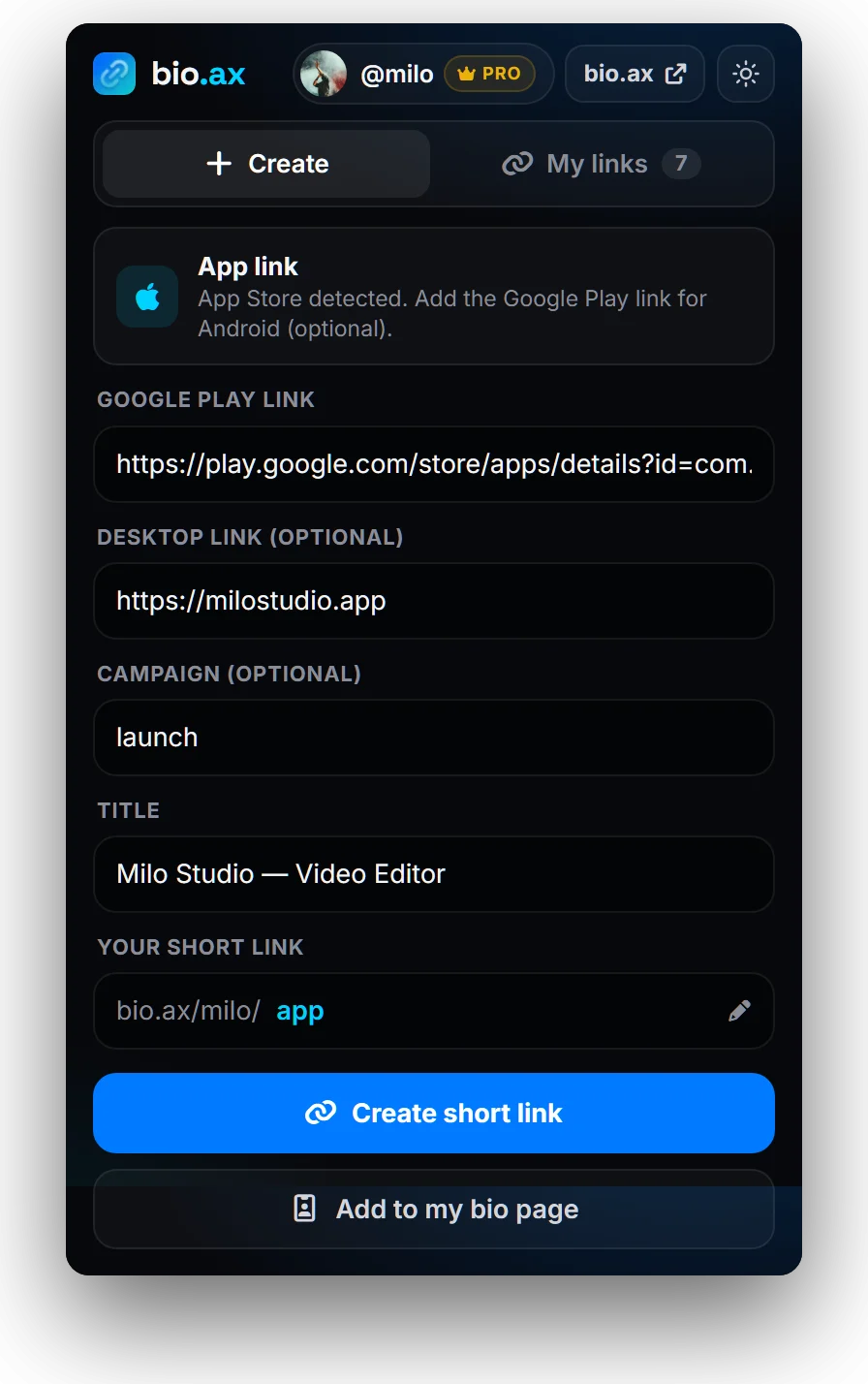
On an App Store or Google Play page

One link for your app, created from its store page.

Open the extension on your app's App Store or Google Play page: it switches to App link mode by itself. Add the other store's link and, if you want, a campaign name. Your Bio.ax link sends iPhones to the App Store, Android to Google Play and computers to a page with a QR code.

  • Store detected automatically
  • Desktop address optional
  • Install tracking per campaign
Everything about the app link
Bio.ax extension in App link mode on an App Store page: Google Play link, desktop link and campaign to fill in
Right-click and keyboard

Shorten a link without even opening it.

An interesting link in an article, an email or a Google result? Right-click, “Shorten this link with bio.ax”: the extension opens with that link, not the page's. On the page itself, the menu also offers to shorten it or show its QR code.

  • Shorten this link / this page
  • QR code for this page
  • Alt + Shift + B to open bio.ax from the keyboard

The little details that save you time

Everything the extension does for you, with no settings.

Cleaned links

Click identifiers (fbclid, gclid, igsh…) are removed from the address. Your UTMs stay, and an “Undo” button restores everything.

“Already shortened”

If the page already has its Bio.ax link, the extension shows it instead of creating a second one.

Add to my bio page

One button sends the open page to your link-in-bio page, with its title. Free, like the bio page.

Link ending of your choice

Keep the suggested code or write bio.ax/you/promo: availability is checked as you type.

Light or dark mode

A button at the top of the extension, remembered for next time.

In 4 languages

French, English, Spanish and Indonesian, depending on your browser language.

Ready in under a minute

1

Add it to Chrome

On the Chrome Web Store page, click Add to Chrome, then pin the Bio.ax icon from the puzzle piece.

2

Log in to bio.ax

Just once, on bio.ax in the same browser. No account yet? It's free.

3

Click the icon

On any page, or Alt + Shift + B. The link is created, copied, and its QR code appears.

Privacy

Four permissions, and nothing more

The extension does not read your pages in the background and keeps no history. Here is exactly what it asks Chrome for, and why.

Active tab activeTab

Read the tab's address and title, only when you click the icon, use the right-click menu or the shortcut.

Right-click menu contextMenus

Add “Shorten this link”, “Shorten this page” and “QR code for this page”.

Local storage storage

Remember your light / dark choice and the link picked from the right-click menu, on your computer.

Access to bio.ax bio.ax/*

Create and list your links with your Bio.ax session. No other site is contacted.

No ads, no tracking, no data sold. Details in the privacy policy.

Chrome extension: your questions

Installing, account, privacy: what to know before adding Bio.ax to your browser.

Help center

Open the Bio.ax page on the Chrome Web Store and click Add to Chrome. Then pin the Bio.ax icon with the puzzle-piece button to the right of the address bar: it stays visible on every page.

Yes, the extension is free. With a free Bio.ax account you create your first short link, generate QR codes and add pages to your bio page. The Pro plan ($5.99 a month) unlocks unlimited short links, custom link endings, open-in-app links, the App Store + Google Play link and click statistics.

Yes. The extension uses the Bio.ax session already open in your browser: log in to bio.ax once in Chrome, then open the extension. There is no password to type into the extension and no key to set up. If you are not logged in, the extension offers to log in or create a free account.

Only the address and title of the open tab, at the moment you click the icon, use the right-click menu or press the keyboard shortcut. They only go to Bio.ax if you create a link or add the page to your bio page. No browsing history is collected, and there are no ads and no tracking. Details are in our privacy policy.

The extension is published on the Chrome Web Store, which also serves Chromium-based browsers: Microsoft Edge (after allowing extensions from other stores), Brave, Opera, Vivaldi or Arc. It is not available for Firefox or Safari.

Yes. Type chrome://extensions/shortcuts in the address bar and pick another combination for “Open bio.ax”. The shortcut opens the extension on the current page, ready to create the link.

A YouTube or Instagram link tapped in a bio normally opens inside the social network's built-in browser, where the visitor is not logged in: they can't subscribe, comment or buy without signing in again. A Bio.ax link opens the app directly, already logged in. One tap is enough to subscribe or add to cart.

No, your utm_ parameters are kept: they feed your own statistics. The extension only removes the click identifiers added by platforms (fbclid, gclid, igsh, ttclid, msclkid…), with an “Undo” button if you want to keep them.

Chrome on Android and iPhone does not accept extensions. On a phone, create your links from your Bio.ax dashboard: they are the same links, which you also find in the “My links” tab of the extension on a computer.

Links that open in the app, for every platform

The extension detects the platform of the page you are on and prepares the right deep link. See what changes for each app.

YouTubeVideos, Shorts, channels AmazonProducts, affiliate tag SpotifyTracks, albums, podcasts
InstagramProfile, reel, post
TikTokVideo or profile
Apple MusicSong, album, playlist
TwitchChannel live
SoundCloudTrack or profile
App Store + Google PlayYour app download link +100 appsSee the full list

Your next short link is one click away

Add Bio.ax to Chrome, log in once, and shorten any page without leaving the tab.

Add to Chrome, free